
Prayer times are one of the most searched pieces of information in a Muslim’s day. We have rebuilt our prayer times service so that it answers that question for any place on earth, on any screen, and even inside your AI assistant.
One page for every city
Visit quranmajeed.com/time and you see today’s Fajr, Sunrise, Dhuhr, Asr, Maghrib and Isha for your own location, with the Hijri date, a countdown to the next prayer, and the live weather outside your window.
Every city also has its own address. Try quranmajeed.com/time/city/makkah, /city/london or /city/karachi. Each page shows today’s times, the full timetable for the month, the calculation method, and the time zone with daylight saving already applied. More than 6,000 cities are listed in the directory by country, and any other town can be opened simply by typing its name in the address.
A sky that matches yours
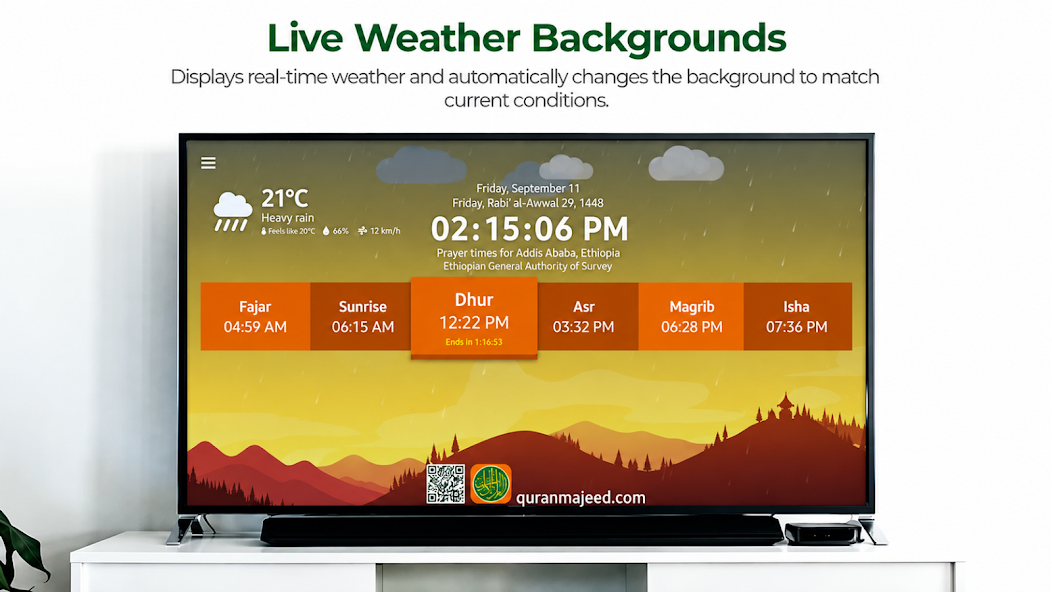
The home page is more than a table of numbers. The background follows the day: a quiet blue before Fajr, a warm sunrise, the bright noon of Dhuhr, the gold of Asr, a Maghrib sunset and a starlit Isha.
The sun and the moon are there as well, placed where they belong. The sun rises on one side of the screen at your city’s sunrise, climbs to its highest point at midday and sets on the other side at sunset, changing colour from the orange of dawn to the white of noon and back. After dark the moon takes over and follows its own path through the night.
The moon is drawn the way you would see it if you stepped outside. Its phase is calculated from the actual positions of the sun and the moon, so a thin crescent at the start of the Hijri month grows to a full moon in the middle and wanes again, with the correct illuminated fraction every night. Its tilt is correct too. The angle of the bright edge changes with your location and the time of night, which is why the crescent lies on its back near the equator and stands upright further north. The page works that angle out for your place and moment, so the crescent on the screen leans the same way as the one in your sky.
On top of that comes the live weather for your location: temperature, how it feels, humidity and wind. And the page shows it, not just tells it. When it rains where you are, rain falls across the screen. Snow drifts down on a snowy day, fog rolls in, clouds thicken when the sky is overcast, and a storm brings flashes of lightning. If you prefer a calm screen, the effects can be switched off in the settings with one tap.
Also on your TV: Samsung and Android TV apps
The same prayer times are available as a free app for the biggest screen in the house. Prayer Time runs on Samsung Smart TVs and on Android TV, and turns the living room screen into a window on the day’s prayers.
The TV app brings everything the website shows: the six daily times with a countdown to the next prayer, the Hijri date, the sky that follows the day, the sun and moon in their real positions with the correct moon phase, and the live weather with rain, snow and fog on screen. On top of that it adds what a television does best. At each prayer time the adhan plays, and you choose the reciter and whether to hear the full adhan or a short call. Alarms can be switched on or off for each prayer, and the app works in English, Arabic and Urdu. It is built for the remote control, so picking your country and city takes a few clicks.
Where to get it:
- Samsung Smart TV: open the Apps store on the TV and search for “Prayer Time”.
- Android TV and Google TV: install Prayer Time Worldwide Edition from Google Play.
Accurate by design
Where an official timetable exists, we use it. London follows the London Central Mosque, Amman follows Jordan’s Ministry of Awqaf, and the same goes for cities across the UAE, Oman, Malaysia, Indonesia, Morocco and more. Everywhere else, times are calculated for the city’s exact coordinates with the method used in that country, such as Umm al-Qura in Saudi Arabia or the University of Islamic Sciences, Karachi in Pakistan.
The website and the TV apps run the same calculation engine, so the numbers match on every device.
Ask your AI assistant
AI assistants are becoming the place where people ask everyday questions. To make sure they answer with real timetables instead of guesses, we have published a Prayer Times MCP server. MCP, the Model Context Protocol, is the open standard that lets assistants such as Claude and ChatGPT connect to live services.
Once connected, you can simply ask: “What time is Isha in Lahore tomorrow?” or “Give me this month’s Fajr times for Toronto.” The assistant calls our server, receives the official or calculated times, and cites the matching city page.
Setting it up takes a minute. In Claude, open Settings, then Connectors, choose “Add custom connector” and enter:
https://time.quranmajeed.com/mcp
No account and no key are needed. The server is free, read-only, and listed in the official MCP registry as com.quranmajeed.time/prayer-times. Step-by-step instructions for Claude, Claude Code, ChatGPT and Cursor are on the setup page. Developers who prefer plain HTTP can use the JSON API described there.
Try it today
Open quranmajeed.com/time, find your city, and watch the sky on the page change with your own. Install the app on your TV so the adhan reaches the whole family. And the next time you talk to an AI assistant, let it check the prayer time for you.